
Common Passport Photo Mistakes (And How to Avoid Them)
It’s easy to underestimate how much damage a tiny photo can do. But passport or visa offices reject thousands of applications every year for one simple reason: the photo doesn’t meet the rules. When that happens, the cost isn’t just another photo. It can mean delayed visas, missed flights, and rebooked trips.
If you’re renewing a passport or applying for one for the first time, these are the mistakes that most often cause problems. Make sure your photo isn’t one of them.
Why Passport Photo Rules Are Strict?
Your passport photo isn’t just for visual identification. It’s scanned by automated border systems, which is used for biometric verification. It was also checked against fraud databases. In other words, the photo needs to show your face exactly as it is clearly, evenly lit. And there should be without anything that might confuse the software reading it.
That’s why photo rules are strict, and why “almost right” often isn’t good enough.
Most Common Passport Photo Mistakes
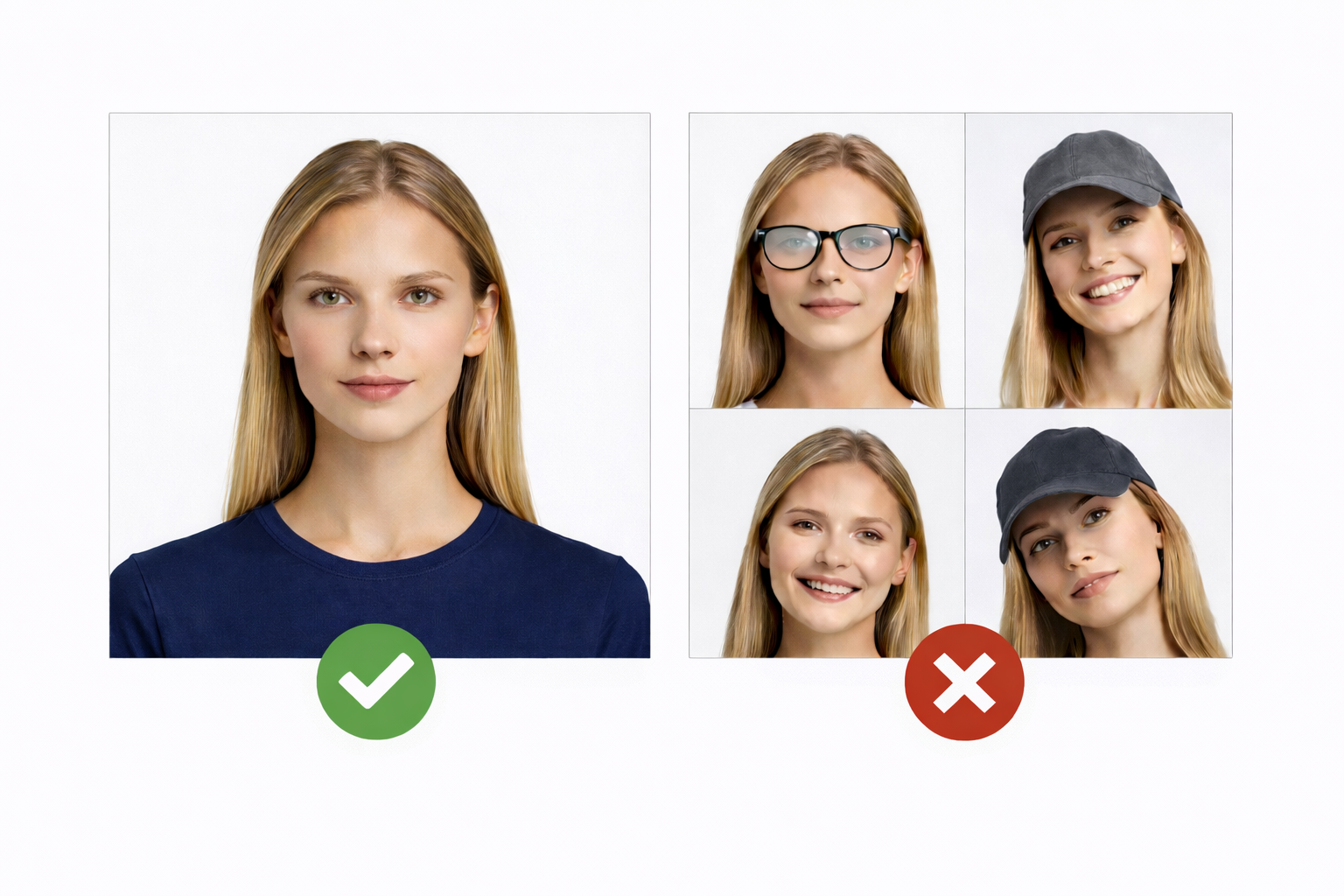
1. Smiling or Making Expressions
A friendly smile might look great on social media, but it changes the shape of your face.
What to do: Keep your face neutral, eyes open, mouth closed, and head level.
Not sure if your expression is allowed? Review the official passport photo smiling rules before applying.
2. Wearing Glasses
Glare, shadows, and reflections from lenses are a top reason photos are rejected.
What to do: Remove your glasses unless you have documented medical reasons to keep them on.
Wearing glasses is one of the most common reasons applications are rejected. Review the full passport photo glasses rules before submitting your photo.
3. Hats and Head Coverings
Caps and fashion hats hide important facial features.
What to do: Only religious head coverings are allowed, and even then, your full face must remain visible from chin to forehead.
4. Busy or Dark Backgrounds
Patterns, colors, and dark walls reduce contrast and confuse scanning systems.
What to do: Stand in front of a plain white or very light-colored background.
Our passport photo background requirements explain the exact wall color, lighting, and setup you need.
5. Shadows
Shadows across your face or behind your head can make your photo unusable.
What to do: Use even lighting from both sides of your face. Natural window light is recommended if it’s balanced.
6. Looking Away from the Camera
Tilting your head or glancing sideways alters your facial proportions.
What to do: Look straight into the camera at eye level.
7. Blurry or Low-Resolution Photos
A photo that looks “okay” on your phone can still fail scanning checks.
What to do: Make sure the image is sharp, well-focused, and high resolution.
8. Filters and Heavy Editing
Beauty filters smooth skin, reshape features, and remove natural detail.
What to do: Submit a completely natural, unedited photo.
9. Incorrect Size or Crop
Even a perfect photo can be rejected if it’s the wrong size.
What to do: Follow your country’s exact photo dimensions and cropping rules.Use our online passport photo maker to automatically resize your photo to the official 2×2 inch format.
10. Using an Old Photo
If you look noticeably different now, your application may be delayed.
What to do: Use a photo taken within the last three or six months, depending on your country requirements
11. Hair Covering the Face
Hair hiding your eyes or eyebrows makes identification harder.
What to do: Pull hair back so your full face is clearly visible.
Review the full passport photo hair requirements to make sure your eyes and eyebrows are fully visible.
12. Wearing Uniforms or Camouflage
Clothing that suggests an official role can cause complications.
What to do: Wear simple, everyday clothes in neutral colors.
If you’re unsure what clothing is acceptable, see our full guide on what to wear for a U.S. passport photo to avoid rejection.
How to Get a Passport Photo Right the First Time?
Before you submit your photo, double-check the followings:
-
Your expression is neutral
-
Your face is centered and straight
-
The background is plain and light
-
Lighting is even without shadows
-
You’re not wearing glasses, hats, or accessories
-
The image is clear and in high resolution
-
The photo meets the size requirements
Final Reminder
Passport photo rules exist to protect your identity and ensure secure international travel. Before submitting your application, review your photo carefully. Retaking a photo is easier than dealing with delays, extra costs, or cancelling travel plans.